The interactive now carries its own Singapore Tamil speech and remains usable when the browser exposes no Tamil voice.
An interactive can display Tamil perfectly and still fail at the moment that matters: when a learner presses Read Aloud.
That was the problem with this Singapore Tamil vocabulary activity. Its code correctly requested the ta-SG locale through the browser's Web Speech API, but the device did not expose a Singapore Tamil voice. The activity could either remain silent or fall back to an unsuitable system voice.
With Codex acting as an agentic engineering partner, we diagnosed the limitation, found a supported Singapore Tamil neural voice, generated the required speech assets, rewired the interactive to use them offline, fixed a touch-playback issue, tested every audio file, and produced an SLS-ready ZIP.
The result is not merely a workaround on one computer. It is a portable interactive that carries its own Singapore Tamil speech.
Why browser Tamil speech failed
The original activity used standards-based voice detection:
const voices = window.speechSynthesis.getVoices();
const taSGVoice = voices.find(voice => voice.lang === "ta-SG");
However, getVoices() returns only voices exposed by the current browser and operating system. Support varies by device, installed language packs, browser, school management policies, LMS iframe behavior, and whether speech synthesis is implemented at all.
Setting utterance.lang = "ta-SG" requests a locale. It does not install a matching voice. For a Singapore classroom resource, silently substituting ta-IN, ta-MY, or an English system voice is not acceptable.
The architecture that worked
Microsoft documents dedicated Singapore Tamil neural voices:
ta-SG-VenbaNeural, female;ta-SG-AnbuNeural, male.
Azure Speech is an online service, not a small JavaScript library that can simply be copied into an offline SLS ZIP. A live application can call it through a secure backend, but an API key must never be placed in public client-side HTML.
Because this activity uses a fixed vocabulary, the dependable design was:
- Generate every required phrase once using
ta-SG-VenbaNeural. - Store the MP3 files inside the interactive.
- Prefer packaged audio for normal and slow playback.
- Keep an exact browser
ta-SGvoice only as a secondary fallback. - Place all assets in the final ZIP for offline SLS use.
Step 1: Audit every spoken phrase
| Tamil | Meaning | Packaged audio |
|---|---|---|
| பள்ளி | School | audio/palli.mp3 |
| புத்தகம் | Book | audio/puththagam.mp3 |
| நண்பன் | Friend | audio/nanban.mp3 |
| ஆசிரியர் | Teacher | audio/aasiriyar.mp3 |
| வீடு | House | audio/veedu.mp3 |
| உணவு | Food | audio/unavu.mp3 |
| தண்ணீர் | Water | audio/thanneer.mp3 |
| மரம் | Tree | audio/maram.mp3 |
The listening exercise also contained two contrast words, வீது and தணீர். They required their own clips. Missing dynamically spoken phrases would leave hidden gaps in the offline experience.
Step 2: Confirm and generate the voice
For this implementation, Codex used the open-source edge-tts command-line client to access Microsoft's online speech service during development.
python -m pip install edge-tts
python -m edge_tts --list-voices | Select-String '^ta-SG-'
The result included both Singapore Tamil voices. A single clip was generated with:
python -m edge_tts `
  --voice ta-SG-VenbaNeural `
  --text "பள்ளி" `
  --write-media "audio/palli.mp3"
The included generate_tamil_audio.ps1 script contains the full phrase manifest and regenerates every clip:
Set-Location "Interactive_20260606032934"
.\generate_tamil_audio.ps1
The script stores Tamil as Unicode escape sequences and decodes them at runtime. This prevents mojibake in older Windows PowerShell versions that do not reliably interpret UTF-8 source files without a byte-order mark.
For a formal service integration, use the official Azure Speech SDK or REST API with credentials held on a secure backend. The offline interactive should receive generated media only, never the cloud service key.
Step 3: Map text to local media
const vocabulary = [
  {
    tamil: "பள்ளி",
    roman: "paḷḷi",
    meaning: "School",
    audio: "audio/palli.mp3"
  }
];

const minimalPairAudio = {
  "வீது": "audio/veethu.mp3",
  "தணீர்": "audio/thaneer.mp3"
};
A helper now resolves a phrase to its packaged asset before considering browser speech:
function getPackagedAudioPath(text) {
  const word = vocabulary.find(item => item.tamil === text);
  return word?.audio || minimalPairAudio[text] || null;
}
Step 4: Prefer offline playback
async function speakText(text, slow = false) {
  stopCurrentSpeech();

  const audioPath = getPackagedAudioPath(text);
  if (!audioPath) {
    speakWithBrowserVoice(text, slow);
    return;
  }

  const audio = new Audio(audioPath);
  audio.playbackRate = slow ? 0.7 : 1;
  audio.preservesPitch = true;
  currentAudio = audio;

  await audio.play();
}
Normal and slow playback still work. Pitch is labelled as browser-voice-only because reliable real-time pitch shifting of packaged MP3 requires a separate audio-processing layer.
Step 5: Fix touch playback
Agentic browser testing uncovered a subtle issue. The original smartboard handler delayed its callback by 50 ms:
setTimeout(() => callback(), 50);That delay can move audio.play() outside the trusted user gesture, causing the browser to block sound even though the learner tapped the button.
The corrected handler runs playback synchronously and uses timestamps for debouncing:
if (touchDuration < 1000 && withinBounds) {
  if (touchEndTime - lastActivationTime < 50) return;

  lastActivationTime = touchEndTime;
  suppressClickUntil = touchEndTime + 500;
  event.preventDefault();
  callback();
}
This preserves the audio permission while still suppressing IR touch bounce and duplicate synthetic clicks.
Step 6: Make diagnostics truthful
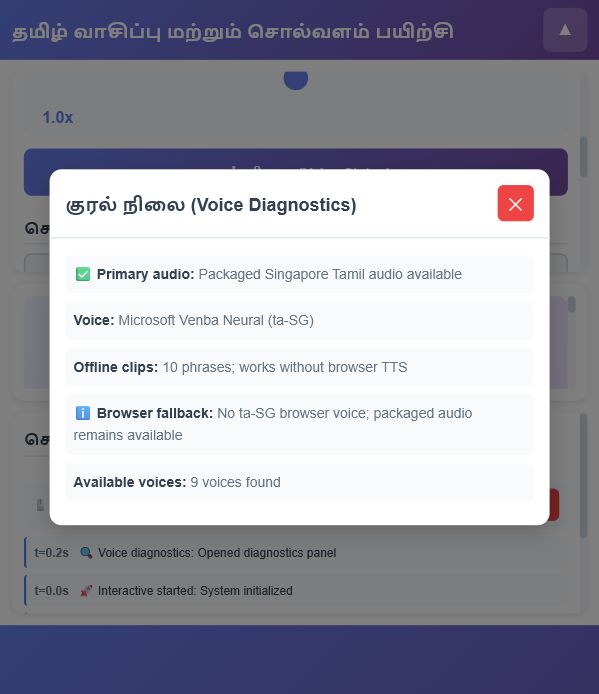
The voice panel now reports:
- Primary audio: packaged Singapore Tamil audio;
- Voice: Microsoft Venba Neural (
ta-SG); - Offline clips: ten phrases;
- Browser fallback: available or unavailable.
A missing browser voice is informational, not a failure. Packaged audio remains active.
Step 7: Test before packaging
node --check script.js

Get-ChildItem audio -Filter *.mp3 | ForEach-Object {
  ffmpeg -v error -i $_.FullName -f null -
}

python -m http.server 8766 --bind 127.0.0.1
The final checks confirmed that the Tamil UI rendered, all ten MP3 files decoded, media was served as audio/mpeg, playback controls enabled after word selection, diagnostics reported packaged audio, and the activity did not depend on browser speech synthesis.
Step 8: Build the SLS ZIP correctly
index.html
script.js
styles.css
audio/
  aasiriyar.mp3
  maram.mp3
  nanban.mp3
  palli.mp3
  puththagam.mp3
  thaneer.mp3
  thanneer.mp3
  unavu.mp3
  veedu.mp3
  veethu.mp3
index.html must be at the ZIP root. Avoid an additional wrapper folder that prevents the LMS from locating the launch file.
Compress-Archive `
  -Path "Interactive_20260606032934\*" `
  -DestinationPath "Interactive_20260606032934_with_offline_tamil_audio.zip" `
  -Force
What Codex and agentic AI contributed
This outcome was possible because Codex did more than suggest code. It operated across the complete engineering loop:
- Observed the interactive and its failure mode.
- Inspected the spoken vocabulary and voice-selection logic.
- Researched authoritative locale and voice support.
- Selected an offline-compatible SLS architecture.
- Generated all required Singapore Tamil media.
- Patched playback, touch handling, and diagnostics.
- Tested syntax, media decoding, delivery, and UI behavior.
- Packaged the final classroom-ready artifact.
The speech technology is not exclusive to Codex. Codex made the conversion practical by coordinating the diagnosis, tooling, code changes, browser testing, and packaging in one working session.
That is the useful meaning of agentic AI: not merely describing how work might be done, but carrying it through until the artifact is usable.
Replicate this for another language
- Identify the exact curriculum locale.
- Enumerate every phrase that can be spoken.
- Confirm a suitable voice from an authoritative provider.
- Ask a fluent educator to review pronunciation and local wording.
- Generate one local asset per stable phrase.
- Map phrase identifiers to media paths.
- Keep browser TTS only as an exact-locale fallback.
- Preserve synchronous user activation for playback.
- Add diagnostics that state the actual voice and locale.
- Test offline, in an iframe, and on touch hardware.
- Package all assets with
index.htmlat the ZIP root.
For highly dynamic text, prerecorded clips will not scale. Use a secure server-side speech endpoint with caching instead.