Teacher Demonstration
Use the live model as a shared screen demonstration before students try their own predictions and observations.
Explore Ball Toss Video Model as an interactive EJS simulation for mechanics.
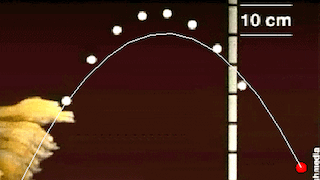
Use the live model as a shared screen demonstration before students try their own predictions and observations.
Open the simulation, adjust the controls, and compare what changes on screen before answering the concept-check questions.
After launch, which force changes the projectile's vertical motion?
Choose initial speed and angle, then predict the shape of the trajectory.
Compare horizontal and vertical motion during flight.
If air resistance is included, compare the trajectory with the ideal case.
State which forces act after launch and how they change the motion.
Use the model to connect kinematics graphs to force reasoning. Students often think a force continues in the launch direction; this challenges that idea.
Ask: What force acts after the projectile leaves the launcher? Why does horizontal motion differ from vertical motion?
Separate during-launch from after-launch. Require forces only for the flight phase before describing the trajectory.
These questions are generated from the topic and the concept illustrated by the simulation. Use them after students have explored the model.
Correct first attempts build a streak and unlock higher point multipliers on this device.
1. In ideal projectile motion after launch, which force acts on the projectile?
2. What happens to horizontal velocity in the ideal no-drag model?
3. What causes the projectile's path to curve downward?
4. Why compare with and without drag?
5. What is a strong explanation of the flight?
Anonymous activity counts show that this resource is being discovered and used.