Teacher Demonstration
Use the live model as a shared screen demonstration before students try their own predictions and observations.
Explore Ball And Motor Controlled Beam as an interactive EJS simulation for mechanics.
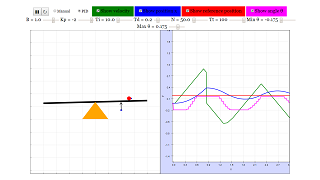
Use the live model as a shared screen demonstration before students try their own predictions and observations.
Open the simulation, adjust the controls, and compare what changes on screen before answering the concept-check questions.
Which force has the larger turning effect, and how does its distance from the pivot matter?
Identify the point about which the object can turn before changing any force.
Use force size and distance from the pivot to predict clockwise or anticlockwise turning.
Adjust one mass or position until the beam is level or the rotation stops.
Explain the result using clockwise moment equals anticlockwise moment.
Use this as a moment-equilibrium lesson. Make students name the pivot and perpendicular distance before using numbers.
Ask: Which force is farther from the pivot? Would a smaller force at a larger distance balance a bigger force nearer the pivot? What evidence shows equilibrium?
Have students make a prediction from moments first, then move only one mass or force at a time to test it.
These questions are generated from the topic and the concept illustrated by the simulation. Use them after students have explored the model.
Correct first attempts build a streak and unlock higher point multipliers on this device.
1. What is the moment of a force calculated from?
2. When is a beam in rotational equilibrium?
3. Why must the pivot be identified first?
4. How can a smaller force balance a larger force?
5. What should a strong explanation include?
Unlocks after 3 correct concept-check answers on this page.
1. A beam balances even though one side has a smaller force. What is the best expert feedback?
2. What is the strongest critique of using the full length of a beam as the moment arm?
3. If a force acts through the pivot, what turning effect does it produce about that pivot?
4. A student says clockwise and anticlockwise forces are balanced. What wording would be more precise?
5. What makes a moments explanation expert-level?
Anonymous activity shows this resource is being discovered, revisited, and used by learners in different places.
Country or region is inferred anonymously from server location headers when available. No names, accounts, or IP addresses are shown.