Teacher Demonstration
Use the live model as a shared screen demonstration before students try their own predictions and observations.
Explore Simple Harmonic Motion Pendulum Model as an interactive EJS simulation for mechanics.
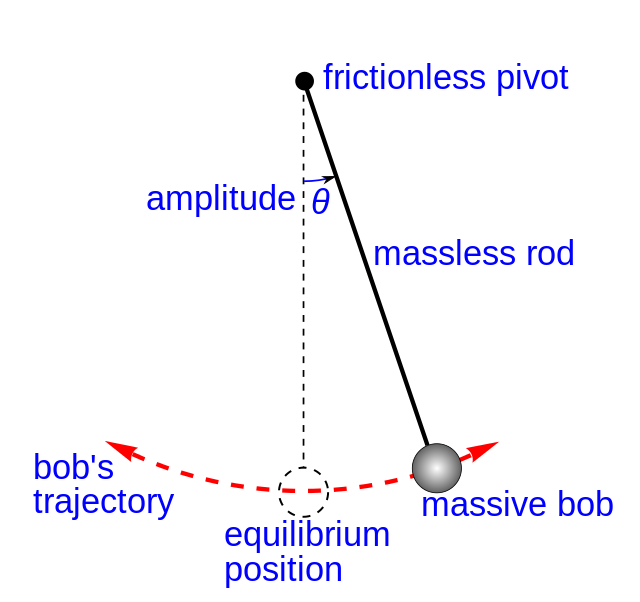
Use the live model as a shared screen demonstration before students try their own predictions and observations.
Open the simulation, adjust the controls, and compare what changes on screen before answering the concept-check questions.
Where is the bob fastest, where does it turn around, and what evidence shows one complete period?
Identify the frames where the bob changes direction.
Find the lowest central position of the swing.
Use repeated positions or graph peaks to time one complete cycle.
Connect restoring effect, speed change, and energy exchange across the swing.
Use this to separate velocity from acceleration at turning points. The bob can have zero velocity while a restoring acceleration acts.
Ask: Where is the bob highest? Where is it fastest? What graph feature repeats every cycle?
Ask students to label highest point, lowest point, velocity direction, and restoring direction on the tracked path.
These questions are generated from the topic and the concept illustrated by the simulation. Use them after students have explored the model.
Correct first attempts build a streak and unlock higher point multipliers on this device.
1. Where is a pendulum usually fastest?
2. What happens to velocity at a turning point?
3. What timing evidence gives the period?
4. What causes the bob to return toward equilibrium?
5. What should students cite?
Unlocks after 3 correct concept-check answers on this page.
1. In a pendulum interactive, where is speed usually greatest and what evidence should be used?
2. What is the best expert feedback for 'the pendulum turns around because tension pushes it sideways'?
3. If the model lets length change, what should students compare?
4. What is the expert response to 'larger amplitude always means a much shorter period'?
5. What makes a pendulum conclusion expert-level?
Anonymous activity shows this resource is being discovered, revisited, and used by learners in different places.
Country or region is inferred anonymously from server location headers when available. No names, accounts, or IP addresses are shown.