Teacher Demonstration
Use the live model as a shared screen demonstration before students try their own predictions and observations.
Explore Working With An Ammeter as an interactive EJS simulation for electricity and magnetism.
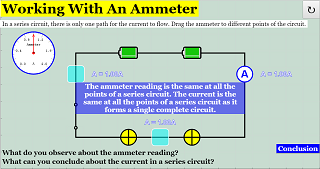
Use the live model as a shared screen demonstration before students try their own predictions and observations.
Open the simulation, adjust the controls, and compare what changes on screen before answering the concept-check questions.
How do the horizontal and vertical components combine to produce the resultant vector?
State the vector direction before breaking it into components.
Use the model to compare horizontal and vertical components as the angle changes.
Combine components or vectors tip-to-tail to find the resultant.
Compare the resultant magnitude and direction with the original diagram.
Use the model to move students between diagram, component values, and resultant direction. Require arrows and signs, not just magnitudes.
Ask: Which component changes when the angle changes? Why can two large vectors produce a small resultant? What does the sign of a component mean?
Have students predict component changes before dragging the vector. This makes trigonometry a description of the diagram rather than a memorised formula.
These questions are generated from the topic and the concept illustrated by the simulation. Use them after students have explored the model.
Correct first attempts build a streak and unlock higher point multipliers on this device.
1. What makes a vector different from a scalar?
2. What do perpendicular components do?
3. What is a resultant vector?
4. Why does angle matter?
5. What is good evidence from the model?
Unlocks after 3 correct concept-check answers on this page.
1. In a voltmeter-placement interactive, where should the voltmeter be connected?
2. In an ammeter interactive, where should the ammeter be connected?
3. What feedback fits 'meters do not affect circuits, so placement never matters'?
4. How should students verify a meter reading?
5. What makes a meter answer expert-level?
Anonymous activity shows this resource is being discovered, revisited, and used by learners in different places.
Country or region is inferred anonymously from server location headers when available. No names, accounts, or IP addresses are shown.