Teacher Demonstration
Use the live model as a shared screen demonstration before students try their own predictions and observations.
Explore Bound Eigenstate Superposition as an interactive EJS simulation for modern physics.
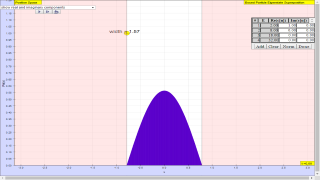
Use the live model as a shared screen demonstration before students try their own predictions and observations.
Open the simulation, adjust the controls, and compare what changes on screen before answering the concept-check questions.
What displayed evidence supports the quantum explanation on this page?
Decide whether the model is showing a spectrum, detector pattern, probability graph, energy level, or measurement result.
Adjust one setting linked to the displayed quantum quantity.
Compare the graph, spectrum, detector pattern, or readout before and after the change.
Connect the observed change to photon energy, probability, measurement, energy levels, or wave behaviour as appropriate.
Use this as a model-evidence lesson. Students should first name the representation before using quantum vocabulary.
Ask: What is being measured or represented? What changed on screen? Which part of the display supports the claim?
Require a prediction and a display-based observation before the explanation. This keeps the page from becoming a generic concept quiz.
This is the general Modern Physics fallback; narrower profiles should be used when the page source identifies a specific simulation type.
These questions are generated from the topic and the concept illustrated by the simulation. Use them after students have explored the model.
Correct first attempts build a streak and unlock higher point multipliers on this device.
1. What is the central question in a dynamics investigation?
2. What does a force diagram help students do?
3. What should be used to predict acceleration?
4. If resultant force is zero, what happens to acceleration?
5. What is a strong final explanation?
Unlocks after 3 correct concept-check answers on this page.
1. In a wave packet, square-well, or eigenstate interactive, what should students identify first?
2. What feedback fits 'probability density is the same as the wavefunction value'?
3. How should students interpret nodes in a bound-state display?
4. What should students compare in a superposition model?
5. What makes a wavefunction answer expert-level?
Anonymous activity shows this resource is being discovered, revisited, and used by learners in different places.
Country or region is inferred anonymously from server location headers when available. No names, accounts, or IP addresses are shown.