Static and Kinetic Friction Interactive Simulation
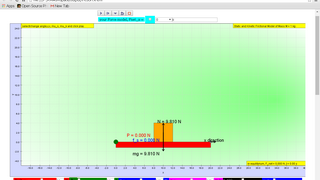
Explore how static and kinetic friction affect the motion of a 1 kg mass. This browser-based EJS simulation helps students connect applied force, frictional force, acceleration, and motion.
1. Watch the Idea
2. Big Ideas
What Students Can Learn
- Compare static friction and kinetic friction.
- Observe how friction changes when applied force increases.
- Connect force, acceleration, and motion in a Newtonian mechanics context.
- Interpret the free-body diagram, normal force, friction force, applied push, and net force labels.
- Use the model as an exploratory activity before or after classroom explanation.
Guiding Question
If a force is applied to a block and it does not move, does that mean no force is acting on it?
The simulation makes this question visible because the applied force and friction force can be displayed at the same time. Students can see that balanced forces still exist.
3. Try the Investigation
Start With No Push
Open the simulation and set the horizontal applied force to zero. Observe the position, velocity, acceleration, normal force, weight, and net force.
Increase Applied Force Slowly
Increase the applied force while the block remains at rest. Compare the applied force and static friction force.
Cross the Static Friction Limit
Keep increasing the applied force until the block starts moving. Notice when the model changes from static friction to kinetic friction.
Change the Surface
Adjust the static friction coefficient and kinetic friction coefficient. Predict whether the block will remain at rest, then test the prediction.
Explain With Net Force
Use the displayed force values and graph to explain why the block accelerates only when the net force along the surface is no longer zero.
4. Model Physics
The simulation is useful because it separates the threshold problem from the sliding problem. Before motion begins, static friction responds to the applied force. After sliding begins, kinetic friction is modelled using the normal force and the kinetic friction coefficient.
f_s <= mu_s N
Static friction can take any value needed up to the maximum static friction.
f_k = mu_k N
Kinetic friction is used once the surfaces are sliding relative to each other.
F_net = ma
The block accelerates only when the resultant force along the surface is non-zero.
N = mg cos(theta) + push_normal
The model lets learners connect angle, normal force, and frictional force.
5. Teaching Notes from OSPSG
Learning Focus
This resource supports modelling of forces and motion. Students can test cases where the net force is zero, then increase the applied force until the block starts moving and the model changes from static to kinetic friction.
- Use the free-body diagram before asking students to calculate resultant force.
- Ask students to state whether friction is static or kinetic before writing an equation.
- Have students compare predicted motion with the live position-time and velocity-time behaviour.
Common Misconceptions
The OSPSG article highlights common force misconceptions: students may think forces disappear at equilibrium, that motion follows the strongest individual force rather than the resultant force, or that force is a property stored inside an object.
A useful correction is to ask: "Which force balances the push right now?" This moves students from naming one dominant force to reasoning with the vector sum of forces.
6. Concept Check
These questions are designed for use after trying the simulation. They check concepts that become visible when students adjust the applied force and observe the frictional force.
1. A block is at rest and the applied force is slowly increased, but the block has not moved yet. What happens to static friction?
2. When the block just starts moving, which change should students notice?
3. If the net horizontal force on the block is zero, what does Newton's Second Law predict?
4. Which misconception does this simulation help challenge?
5. If the coefficient of static friction is increased while the normal force stays the same, what happens to the maximum possible static friction?
6. Why should students avoid writing f_s = mu_s N for every static-friction situation?
7. Glossary
Static friction
A contact force that opposes the start of relative motion between surfaces.
Kinetic friction
A contact force that opposes motion after two surfaces are already sliding relative to each other.
Net force
The vector sum of all forces acting on an object. A non-zero net force causes acceleration.
Equilibrium
A situation where forces balance so the net force is zero. The forces still exist; they do not disappear.
Coefficient of friction
A number that relates frictional force to the normal force for a pair of surfaces. The simulation lets students compare static and kinetic coefficients.
Normal force
A contact force perpendicular to the surface. In this model, the normal force affects the maximum static friction and kinetic friction.
8. Frequently Asked Questions
What is the difference between static and kinetic friction?
Static friction acts before sliding begins and can adjust up to a maximum value. Kinetic friction acts once the surfaces are sliding relative to each other.
Why can the block stay still even when a force is applied?
The applied force can be balanced by static friction. When the resultant force is zero, the acceleration is zero, so the block can remain at rest.
What should students change in this simulation?
Students can change the applied push, angle, initial position, velocity, static friction coefficient, and kinetic friction coefficient, then observe the force diagram and motion graphs.
10. Learning Pulse
See the quiet momentum around this simulation. These anonymous counts help teachers and learners know the resource is being discovered and used.